
Every bit of effort you invest as an Emma Live host or agent deserves to be rewarded with a payout experience that’s just as smooth as possible. In this guide, we’ll take you through the entire withdrawal process from start to finish. Covering the requirements you’ll need to have beforehand, a full walkthrough, solutions to the most common issues you might run into, and answers to the questions hosts and agents ask most frequently. Let’s make sure the withdrawal process is the easiest part of your Emma Live journey.
Emma Live Withdrawal Requirements
Completed Face Verification
Face verification is a non-negotiable requirement for both hosts and agents before any withdrawal can be processed. Hosts need it completed before their first live stream, while agents must have it done prior to initiating their first payout. If you haven’t tackled this step yet, head over to our full face verification guide to get it taken care of.
Verified Email or Phone Number
You’ll also need a verified email address or phone number properly linked to your Emma Live account. Head to your profile and double-check that your contact details are already bound to the app before attempting to move forward with a withdrawal.
Minimum Withdrawal Amount
Your account balance must reach the minimum withdrawal threshold of $10 USD or 7000 Coins before a payout can be initiated. Make sure your earnings have cleared this amount before starting the process.
Active Payment Account
Emma Live processes withdrawals through bank transfer or e-wallet. Whichever option suits you best, ensure that the payment account you plan to use is active and in good standing before submitting your withdrawal request.
Host Withdrawal Tutorial
Step 1: Log In and Go to Your Profile
Open the Emma Live app, log into your account, and head to your profile page.
Step 2: Tap the ‘My Coins’ Menu
From your profile, locate and tap the ‘My Coins’ menu. This is where your earnings are stored and where the withdrawal process begins.
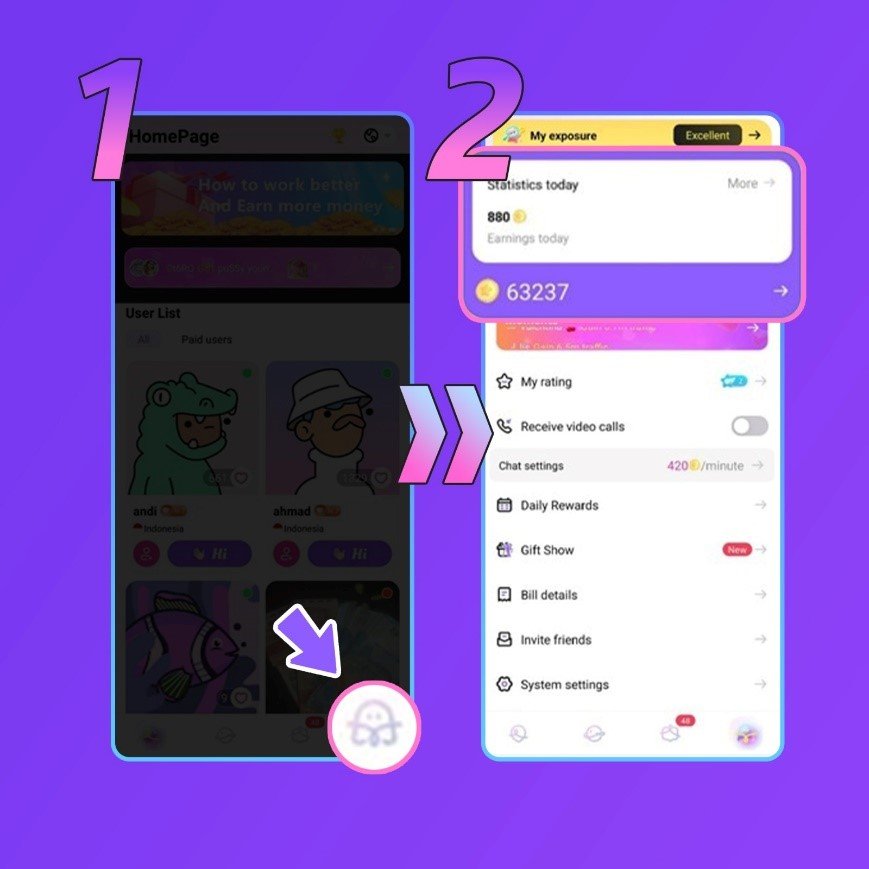
Step 3: Tap ‘Bind Bank Card’ to Set Up Your Payout Method
Inside the menu, tap ‘Bind Bank Card’ to add and configure your preferred payout method. This step is required before any withdrawal can be made.
Step 4: Select Your Payout Method
Choose the option that works best for you. Emma Live currently supports local bank transfer, e-wallet, USDT, GCash, and more. Keep in mind that available methods depend on your country.
Step 5: Fill Out the Required Information
Complete all the necessary fields for your chosen payout method. Make sure every detail is entered accurately to avoid any delays or failed transactions.
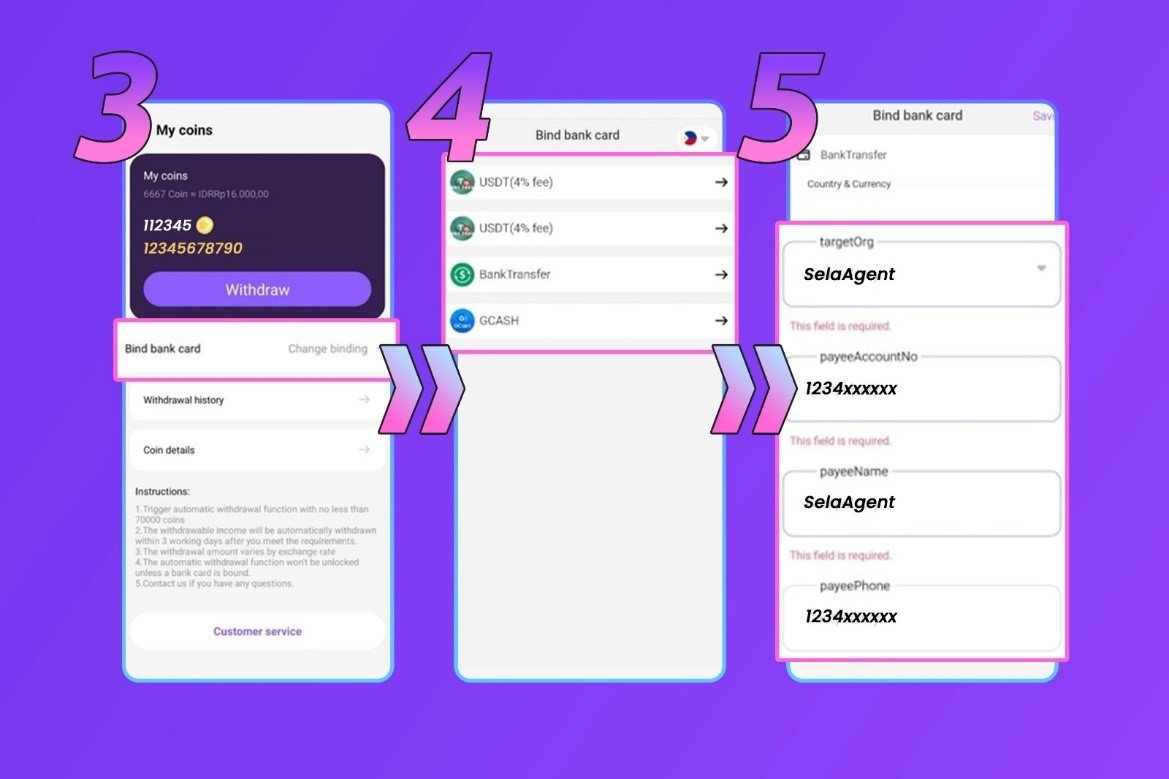
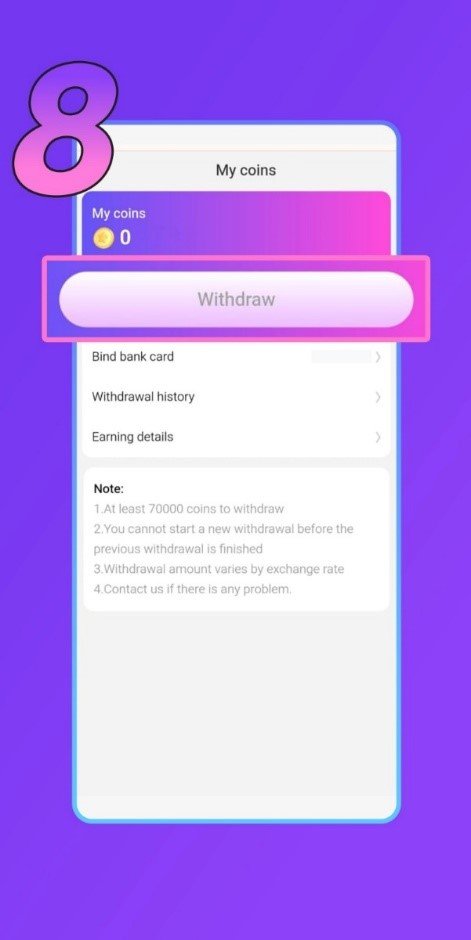
Step 6: Head Back to ‘My Coins’ and Withdraw Your Earnings
Once your payout method is successfully set up, return to the ‘My Coins’ menu to initiate your withdrawal. A few things to keep in mind before confirming:
- The instant payout option will only be available after a payout method has been bound to your account.
- Withdrawals can take up to 1 to 3 business days to process.
- Exchange rates may apply depending on your location and chosen payout method.
Emma Live Agent Withdrawal Tutorial
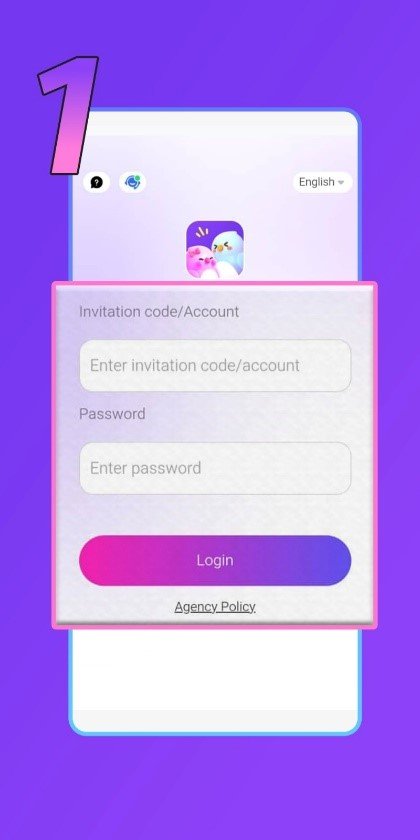
Step 1: Log In to Your Agent Dashboard
Start by logging into your Emma Live agent dashboard using the link provided on this page. Enter your credentials to gain access.
Step 2: Click the ‘My Coins’ Menu
Once you’re inside the dashboard, locate and click the ‘My Coins’ menu. This is where your accumulated earnings are displayed.
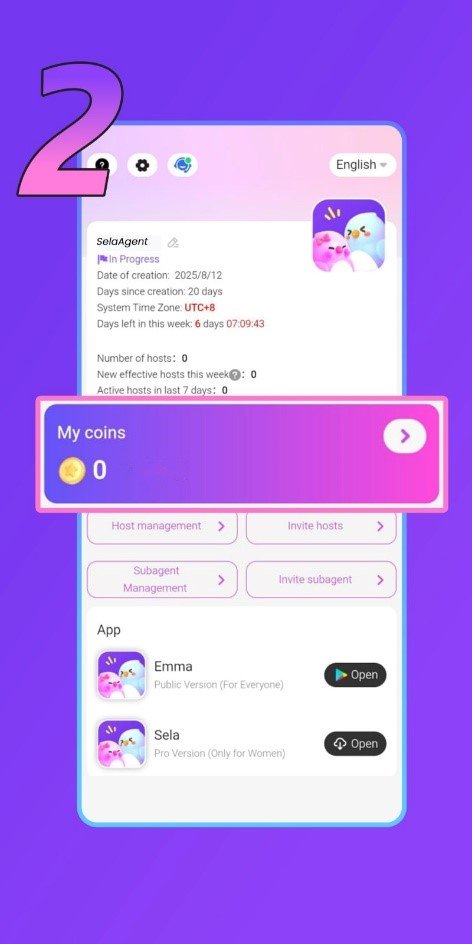
Step 3: Click ‘Bind Bank Card’ to Set Up Your Withdrawal Method
Before any withdrawal can be made, you’ll need to link a payout account first. Click the ‘Bind Bank Card’ option to get started with setting up your preferred withdrawal method.
Step 4: Enter Your Email to Receive a Verification Code
You’ll be asked to enter an email address to receive a verification code. This is a security measure required as part of the binding process. Note that this email doesn’t have to match the email associated with your withdrawal account, it’s simply used for verification purposes.
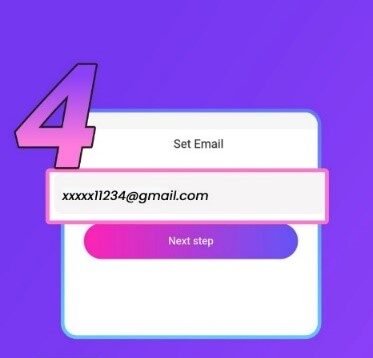
Step 5: Enter the Verification Code
Check your email inbox for the verification code and enter it into the designated field to confirm your identity and proceed to the next step.
Step 6: Select Your Withdrawal Method
Choose the payout option that works best for you. Emma Live currently supports local bank transfer, e-wallet, USDT, GCash, and more. Keep in mind that available methods vary by country, check inside the app for the complete list.
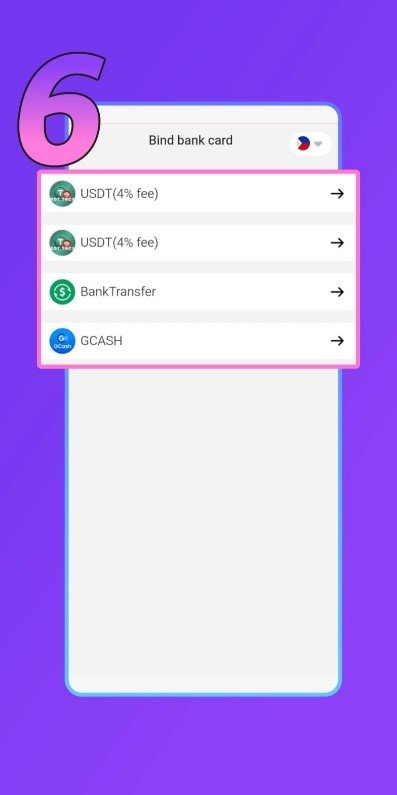
Step 7: Fill Out Your Withdrawal Account Information
Complete all the required fields with your pa yment account details. Take your time with this step and double-check every detail before submitting, any errors could result in a delayed or failed withdrawal.
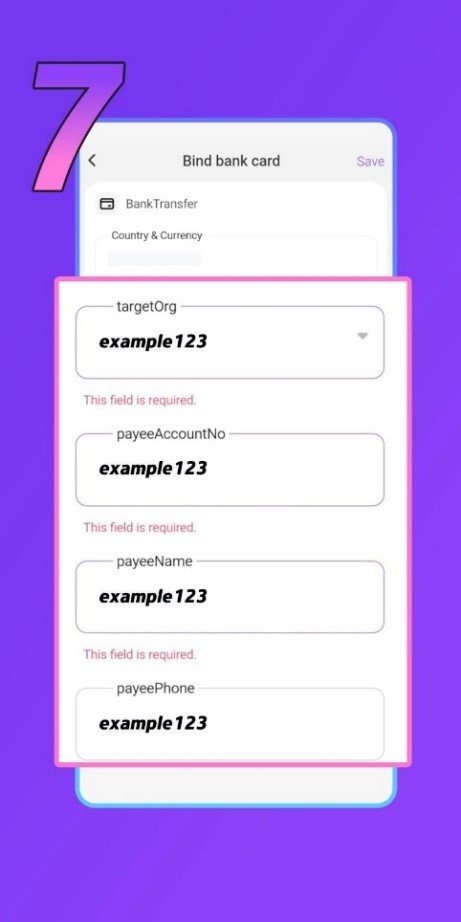
Step 8: Return to ‘My Coins’ and Withdraw Your Earnings
With your withdrawal method successfully bound, head back to the ‘My Coins’ menu to initiate your payout. A couple of things to keep in mind before confirming your withdrawal:
- Processing typically takes up to 1 to 3 business days to complete.
- As an agent, you have the convenience of withdrawing your earnings directly through the agent dashboard without needing to go through the app.
Emma Live Withdrawal Frequently Asked Questions
What is the minimum withdrawal amount?
The minimum amount you can withdraw on Emma Live is $10 USD. Make sure your balance has reached this threshold before initiating a payout.
What payment methods does Emma Live support?
Emma Live currently supports local bank transfer, e-wallet, USDT, GCash, Etisalat, and more. Keep in mind that available methods vary by country, check inside the app for the complete list.
Are there any transfer fees?
This depends on the payment method you choose. Some third-party providers apply their own transfer fees, and the rates can differ from one service to another. It’s worth checking your chosen provider’s fee structure ahead of time.
Can hosts withdraw their own earnings?
Absolutely, hosts have full control over their withdrawals and can request a payout whenever their balance is ready.
What if I linked the wrong payment account?
No need to worry. You can unlink and update your payment details at any time without any restrictions. Simply go back into your account settings and swap out the incorrect account for the right one.
Common Issues & Solutions
My withdrawal failed to process
There are a handful of reasons this might happen, in this case, incorrect payment details, a suspended or inactive account, or a payment method that falls on our restriction list. If this occurs, try switching to a different withdrawal method and contact our support team for further guidance.
A specific payment method isn’t showing up
Certain payment options are only available in select regions. If a method you’re looking for isn’t appearing, it simply isn’t supported in your area. Choose from whichever options are currently available for your location.
My withdrawal is taking longer than expected
Under normal circumstances, withdrawals are processed within one to three business days. In rare case, if yours has been sitting pending beyond that window, reach out to our support team and we’ll investigate and follow up with you as soon as possible.
Your Earnings Are Just a Few Steps Away
In conclusion, once all your requirements are met and your payment method is properly configured, withdrawing your earnings on Emma Live is as simple and seamless as it gets. Whether you’re a host cashing out gifts or an agent collecting commissions, the key to a smooth payout every single time is ensuring your payment details are accurate.
Still have questions about the withdrawal process or anything else on Emma Live? Our support team is always on hand and ready to assist, don’t hesitate to reach out anytime. You can also visit our blog for more helpful tips and guides.